
This is my second build in public entry and here's what I've been cooking so far. TL;DR: Below is a walkthrough on where I'm at with Alfred right now and you can also join the waitlist if you want to use it by clicking here.
I built a Claude Agent SDK-based async agent that connects to a database of workflows and 894 apps out of the box. A workflow is described as steps, tools and prompts, so let's say if I want to create a skill that's finds Christmas presents I could try the following:
Option A: Use Agents
I could use Manus or ChatGPT Agent or Calude and just send a megaprompt. It would look something like this:
You are tasked with researching a person and recommending the perfect Christmas present for them. Follow these steps in order:

---

## Step 1: Research & Profile Creation

- Research the person whose name is provided using web search extensively
- Find information across multiple platforms: LinkedIn, Twitter/X, GitHub, personal websites, news articles, interviews, podcasts, and any other public sources
- Build a comprehensive profile including:
  - Background & biography
  - Career history and professional achievements
  - Interests and hobbies
  - Values and beliefs
  - Public statements and quotes
  - Any other relevant information

**Guidance:** Be thorough. The more information you gather, the better the final recommendation will be.

---

## Step 2: Motivations & Values Analysis

- Analyze the person's core motivations, values, and what drives them
- Consider their career choices, stated interests, and behavioral patterns
- Identify:
  - Primary motivators
  - Core values
  - Personality insights
  - What makes them tick

**Guidance:** Think deeply about what the information reveals. Look for patterns in their interests and choices. Consider psychological factors and what truly motivates this person.

---

## Step 3: Present Research with Purchase Links

- Based on your analysis, research and find the **top 5 Christmas present ideas** with direct purchase links
- For each present, determine:
  - Product name
  - Direct URL to purchase
  - Price range
  - Why it matches their profile
  - Match score (0-100)

**Guidance:** Search for actual products on Amazon, specialty retailers, or relevant stores. Ensure URLs are direct product links. Be thoughtful about matching presents to their interests and values. The match score should reflect how well the present aligns with their profile.

---

## Step 4: Persona Embodiment & Selection

- Assume the persona of the person you researched
- Think as they would think, with their values and motivations
- From their perspective, determine which of the 5 presents THEY would most want to receive
- Write a brief internal monologue (2-3 paragraphs) in first person as that person, explaining which present resonates most and why

**Guidance:** Truly embody their perspective. Consider not just what they like, but what they value, what would surprise and delight them, what fits their lifestyle and current goals. The choice should feel authentic to who they are.

---

## Step 5: Final Recommendation

- Based on the persona's choice, deliver a clear final recommendation including:
  - **Selected Present:** (name)
  - **Direct Purchase Link:** (URL)
  - **Price:** (amount/range)
  - **Why This Is Perfect:** (2-3 sentences combining match reasoning and persona insights)
  - **Match Score:** (0-100)

**Guidance:** Present the final recommendation clearly and confidently. Make it easy for someone to act on this recommendation. The "why" should be compelling and specific to the person.```
Pros: Easy.
Cons: It will either work or it won't. Sometimes step 3 is skipped for no particular reason. The prompt and the process is so complex that the agent will start hallucinating more times than not.
Option B: Build a n8n workflow
I could also just build a n8n workflow. There are a lot of ways to build it and many more elegant ways than the example below, but the big challenge here is that now I'm getting lost in the clickity clackity of the n8n workflow builder.
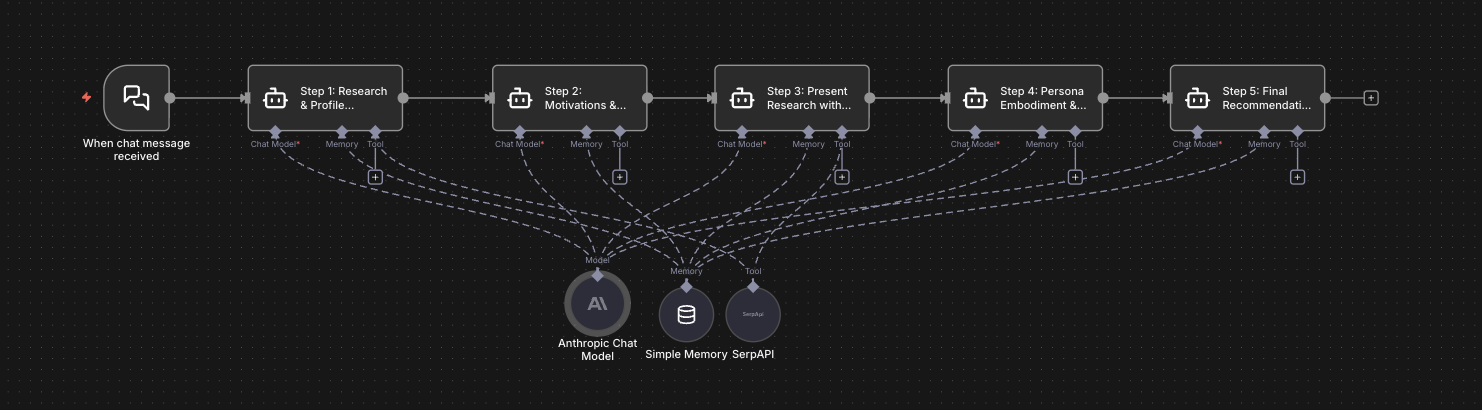
Pros: More control over what happens and what the agents do
Cons: Gets really complex and time consuming to maintain really quickly.
Also, the big problem I have with both options so far is that I'm required to think up the actual workflow, the 5 steps and think about all the different intermediary files that are being generated and read, etc. I don't want to think about it at all.
Option C: Use Alfred
So I built a solution that's a lot simpler. I just want to be able to say:
"Hey Alfred, learn a skill where I give you a name and you research the person to uncover everything you can about them, then analyze their motivations and try to find relevant products that they'd love as christmas presents, roleplay them to see what they'd pick and then recommend that to me."
So Alfred needs a "meta skill" that can be called directly. I'm using the terminal for that so the command would be:
alfred learn "Hey Alfred, learn a skill where I give you a name and you research the person to uncover everything you can about them, then analyze their motivations and try to find relevant products that they'd love as christmas presents, roleplay them to see what they'd pick and then recommend that to me."...and then Alfred just runs the whole thing: it decomposes what I'm looking for, cross checks all the available tools and connections in the system and selects the best way to achieve what I wanted.

...and then when it's done, I can just see the newly added skill in my list:
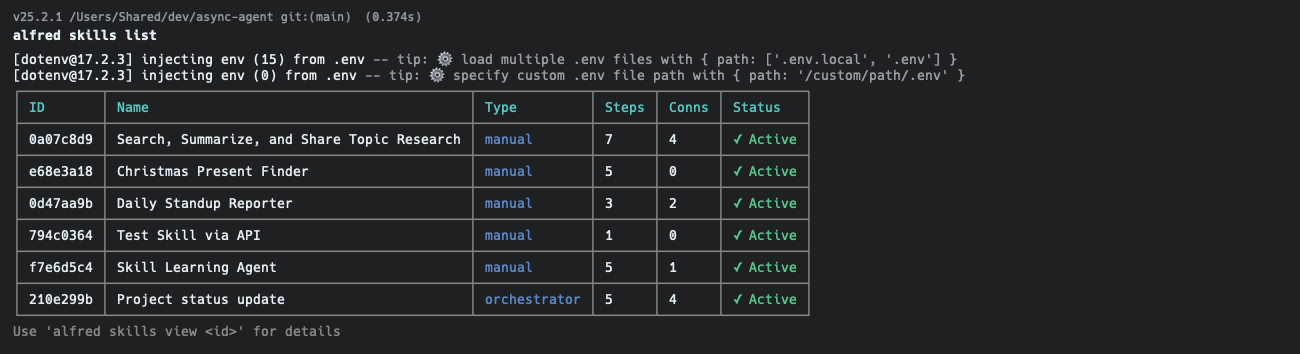
So what does the skill look like? I haven't implemented skill viewing yet (despite the suggestion at the bottom of the screenshot) but here's what the generated skill does:
| # | Prompt | Guidance | Tools |
|---|---|---|---|
| 1 | Research the person whose name is provided in the original request. Use WebSearch extensively to find information about them (social media, professional profiles, articles, interviews, etc.). Create a comprehensive markdown profile document that includes: their background, career, interests, hobbies, values, public statements, and any other relevant information. Save this as a file named "profile.md" in the working directory. | Be thorough in your research. Search for the person on multiple platforms (LinkedIn, Twitter, GitHub, personal websites, news articles). The more information you gather, the better the final recommendation will be. | WebSearch, Write, Bash |
| 2 | Read the profile.md file you created. Analyze the person's core motivations, values, and what drives them. Consider their career choices, stated interests, and behavioral patterns. Update the profile.md file by adding a new "Motivations & Values Analysis" section that includes: primary motivators, core values, personality insights, and what makes them tick. | Think deeply about what the information reveals. Look for patterns in their interests and choices. Consider psychological factors and what truly motivates this person. | Read, Edit, Write |
| 3 | Based on the updated profile.md, research and find the top 5 Christmas present ideas with direct purchase links. For each present, include: product name, direct URL to purchase, price range, why it matches their profile, and a match score (0-100). Use WebSearch to find actual products that can be purchased online. Save the results as "presents.json" with this structure: {"presents": [{"rank": 1, "name": "", "url": "", "price": "", "reasoning": "", "matchScore": 0}]} |
Search for specific products on Amazon, specialty retailers, or relevant stores. Ensure URLs are direct product links. Be thoughtful about matching presents to their interests and values. The match score should reflect how well the present aligns with their profile. | Read, WebSearch, Write |
| 4 | Read both profile.md and presents.json. Now, assume the persona of the person you researched. Think as they would think, with their values and motivations. From their perspective, which of the 5 presents would THEY most want to receive? Write a brief internal monologue (2-3 paragraphs) explaining which present resonates most and why, speaking in first person as that person. Save this as "persona_choice.txt". | Truly embody their perspective. Consider not just what they like, but what they value, what would surprise and delight them, what fits their lifestyle and current goals. The choice should feel authentic to who they are. | Read, Write |
| 5 | Read persona_choice.txt and presents.json. Based on the persona's choice, identify which present from the list was selected. Return a clear, well-formatted final recommendation that includes: Selected Present (name), Direct Purchase Link (URL), Price, Why This Is Perfect (2-3 sentences combining the match reasoning and persona insights), and Match Score. Format this as a clean, readable response. | Present the final recommendation clearly and confidently. Make it easy for someone to act on this recommendation. The "why" should be compelling and specific to the person. | Read |
But how do I use it? For that I created a fancy Claude Code copycat UI as below:
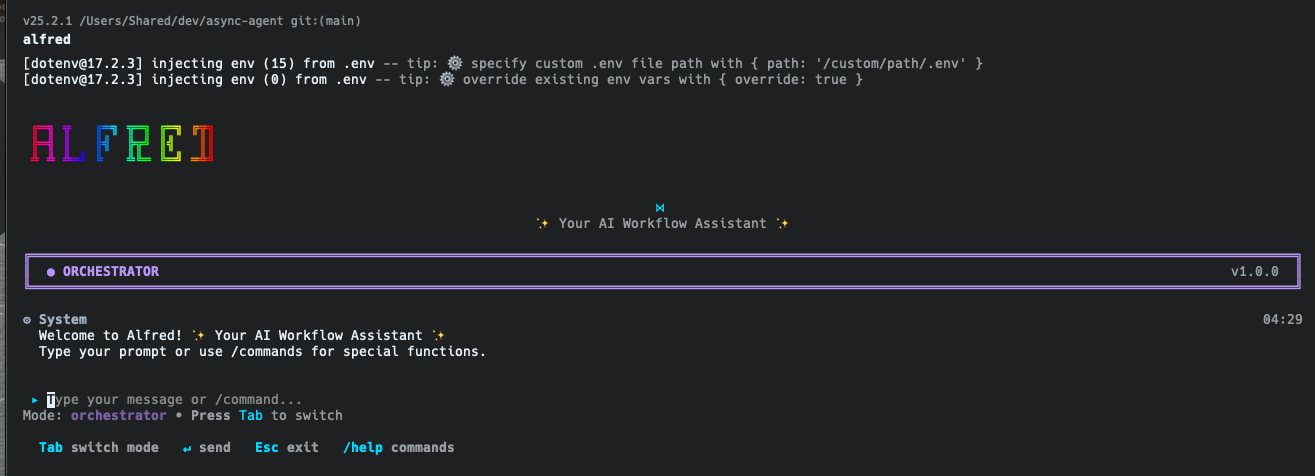
It's ugly af, but it does the job. It has three modes:
- Orchestrator → matches your query with a relevant skill and executes the skill
- Classifier → tries to match your query with a relevant skill and returns the skill name.
- Default → tries to rawdog your query and execute as is by finding the right tools
So when I run a query that says:
"What would be the best Christmas present for David Szabo-Stuban"?
Alfred will find the Christmas Skill Finder skill and execute the tools as per the skill documentation and enforces the right tool use all the time due to extreme separation of concerns. Below is a screen recording. It's a heavy research task so it took a while so I sped up the recording:
Connect Alfred to 894 apps!
The above example is really basic. IF you just prompt ChatGPT manually you can get it done yourself (if you have that kind of time, which I don't).
Problems start when I want Alfred to do things like a project status report which would include things like:
- Get all project updates and comments from the last 7 days from Linear
- Get all Github commits from the last 7 days from any repo that may be relevant to this project
- Prepare a nice HTML formatted report and send it to me via email
- Send a notification on Slack
This is when both agents and n8n fail considerably.
Agents will need connections → Manus and Claude support MCP connections, ChatGPT is still meh on that one.
Agents will push back asking for feedback → Agents are being more and more fine-tuned to be cautious and ask for feedback to avoid hallucinations. But that kills the purpose of agency. When I say do X I don't want the agent to do half of it and then come back saying I'm doing it do you want me to continue?
That pisses me the hell off.
n8n needs tinkering → every connection needs a credential. You'll need to manuall go through the payload, find the right data structures, references, write JSON expressions etc.
n8n graphs are brittle → even if you configure everything in your workflow well, it might still fail when ANY of your connections change ANYTHING in their API.
So I started using Composio (composio.dev) for Alfred, which means that now Alfred can connect to 894 tools OUT OF THE BOX. Not to mention how easy it is to connect a new app.
You just type alfred connections and see all your connections:
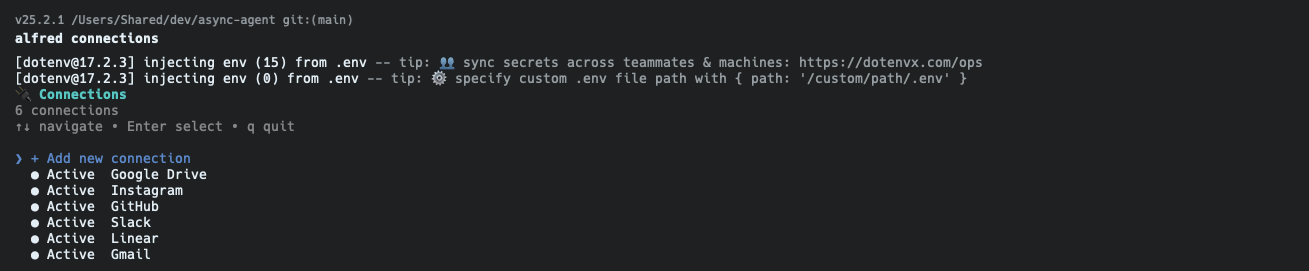
You hit enter to add a new connection and type in the app you're looking for, like "Facebook" or "Sharepoint":

If the app uses API keys you'll be asked to paste the API key in. If it uses OAuth, you just get a link you need to click to login. The Composio integration handles all of it for you.
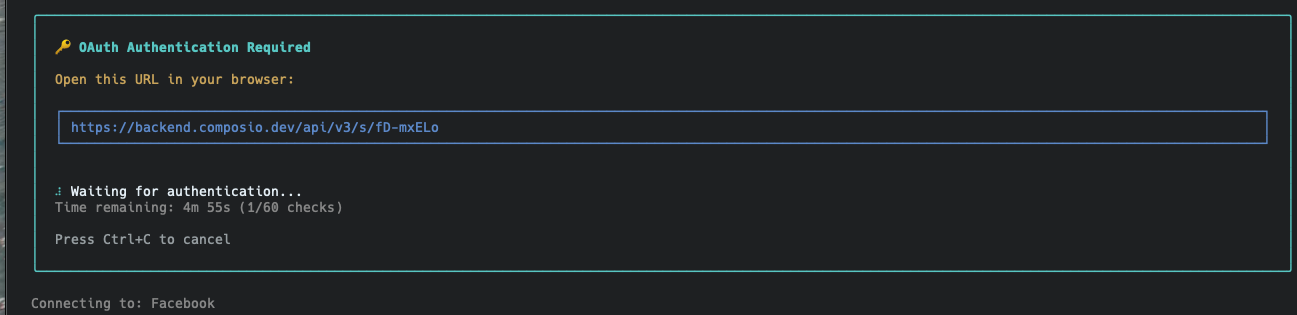
And then voila! Within less than 60 seconds you connected Facebook to your Alfred account.
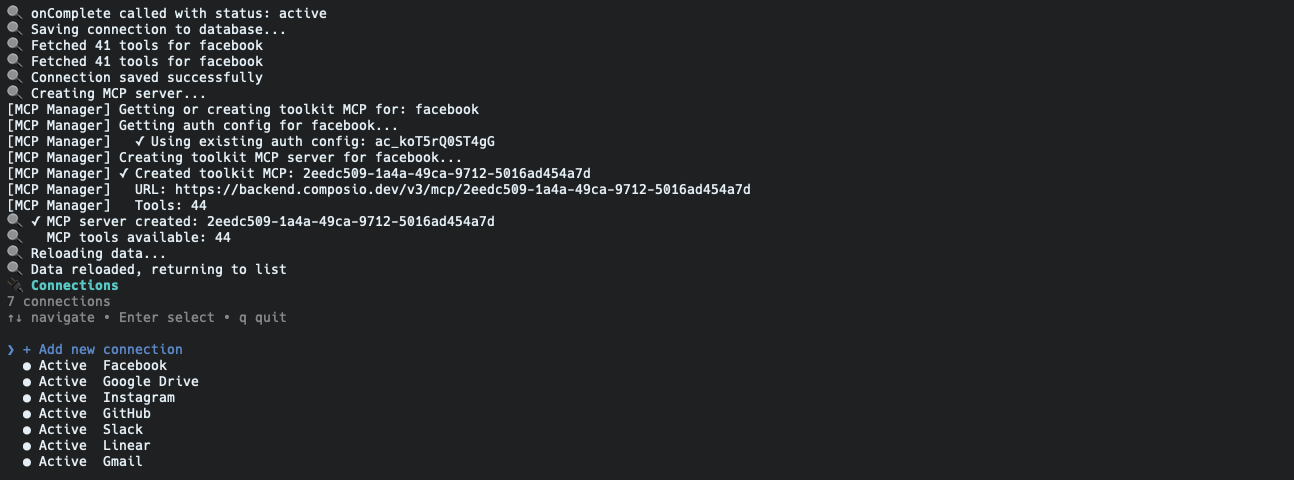
When an app gets connected, Alfred automatically generates a unique MCP server and fetches all the tools from that server so it can remember to use them when executing skills.
So now I can create a skill that would do my status report:
| # | Prompt | Guidance | Tools |
|---|---|---|---|
| 1 | Find the project on Linear | Find the project details on Linear and get the current status on issues, comments, etc. | LINEAR_RUN_QUERY_OR_MUTATION, Write, Read, Bash, Edit |
| 2 | Find all relevant Github repositories and get the last week's commits so you understand the status | — | GITHUB_LIST_REPOSITORIES_FOR_THE_AUTHENTICATED_USER, GITHUB_LIST_ORGANIZATION_REPOSITORIES, GITHUB_LIST_COMMITS, GITHUB_SEARCH_REPOSITORIES, GITHUB_GET_A_COMMIT, GITHUB_COMPARE_TWO_COMMITS, Write, Read, Bash, Edit |
| 3 | Prepare an HTML formatted email status report for David | — | Write, Read, Bash, Edit |
| 4 | Send the HTML formatted email to David to david@sabo.tech | — | GMAIL_SEND_EMAIL, Write, Read, Bash, Edit |
| 5 | Summarize the contents of the HTML report you just sent out in a bulleted, casual Slack message with a direct link to read the report. | — | SLACK_SEND_MESSAGE |
The elegant bit is that Alfred never uses the Github MCP server or the Slack MCP server for this. Instead it procedurally configures and launches a unique MCP server with fine grained tool access that then gets shut down immediately after execution is complete. No need to deal with authentication, all handled in the background.
Agentic Automation?
So we have agents executing deterministic workflows in a way where the agent has a narrow scope and a single objective and a very specific toolbox. This means that Alfred can use smaller, slower, cheaper models. It doesn't have to be so smart because it externalizes the orchestration to the database where the skill config is stored.
A few thoughts on this:
→ This can go really batshit crazy quickly. In order to create a "Skill Learning Skill" I needed to create a "self introspection MCP server" for Alfred. Which means that Alfred can now observe its own logs. I could create a skill that runs on a schedule and analyzes execution logs from the last week to find potential improvements and then actually improve the skills in the database. The way I'd create that is exactly the same as I create any skill: natural language with lazy wording.
→ Skills can invoke other skills or make use of Claude Agent SDK's built in tools like Tasks or Subagents. This opens the door to multi-agent execution of incredibly complex long running tasks.
→ Since every agent executes an atomic step in the process, and everything is logged, the whole system is not only auditable, but I could go back in time and retry a skill execution from step 4 of a specific skill that was run last Thursday 2am.
→ Skills are now being invoked manually, but Alfred also exposes a webhook, a cron service and an MCP server, which means that I can use Alfred:
- Via my terminal as demonstrated
- In any app, n8n workflow or Zap via Webhook
- Add to any voice agent (ElevenLabs, VAPI, etc) by adding the MCP server
- Add to Claude, Manus, etc by adding the MCP server
- ...or add Alfred to my Home Assistant Voice PE gadget so I have an "Alexa" that uses natural language, speaks both English and Hungarian, always available and is connected to all my tools.
Next I'm trying to finish the cron service and debug some parts of the self introspection mcp server and hoping to launch this as a public product soon. This will include AlfredOS which will preinstall a bunch of open source apps for you too, so if you purchased AlfredOS, you'll be able to use the credits:)
If you're interested, join the Alfred waitlist by filling the form on my Stan Store: